Understanding Multiple Sub-Processes
Multiple Sub-Processes allow the creation of several occurrences or instances of the same Sub-Process.
Bizagi allows the easy configuration of multiple Sub-Processes through a Wizard.
Example: A Classroom Scenario
To illustrate how a Multiple Sub-Process works, consider the following example:
In a school, several students need to be enrolled to attend class.
- Applications from students are received.
- Then, an Enrollment Process is created—one for each student.
This business situation can be modeled as shown in the following diagram:
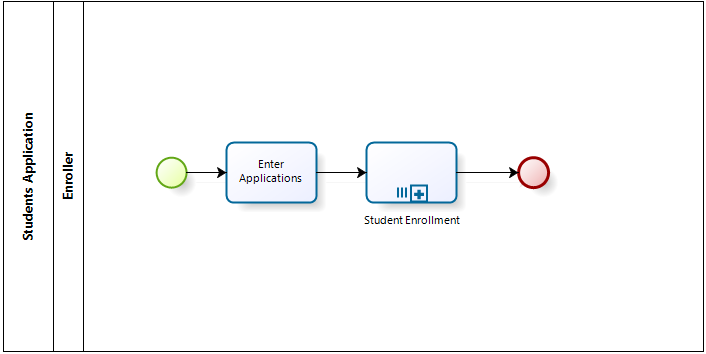
The diagram depicts two Processes:
- Students Application Process → Parent Process, where all students submit their applications.
- Student Enrollment Process → Child Process, which creates one case per student independently.
Process Data and Multiple Instances
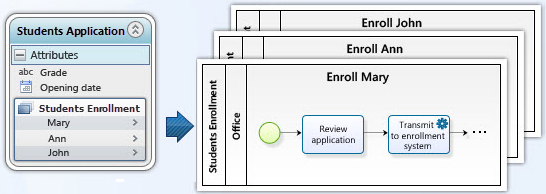
The following image shows how Process data is used to create multiple instances of the Students Enrollment Process.
Steps to Configure a Multiple Sub-Process
Follow these steps to configure a Multiple Sub-Process:
1. Define and Diagram the Parent Process
-
In Step 1 of the Process Wizard, diagram the Parent Process.
-
In this case, the Parent Process is the Students Application Process.
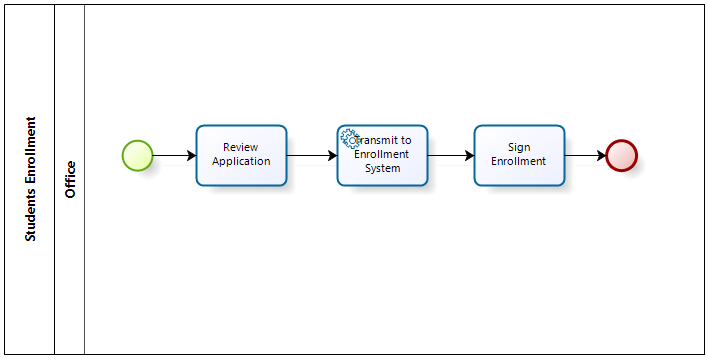
2. Define and Diagram the Child Sub-Process
-
In Step 1 of the Process Wizard, diagram the Child Process.
-
In this case, the process that performs individual Activities for each student who applied is the Students Enrollment Process.
3. Create a One-to-Many Relationship (Collection)
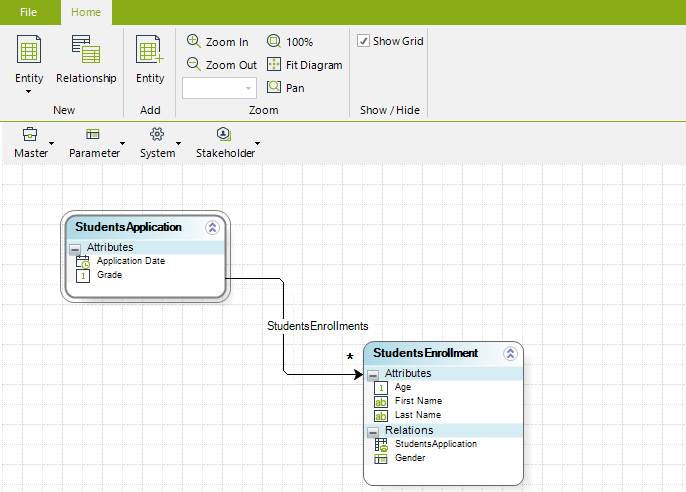
- In Step 2 of the Process Wizard, edit the Parent Process's data model.
- Create a Collection between:
- Students Application (Parent Process)
- Students Enrollment (Multiple Sub-Process)
The relationship will be:
StudentsApplication.StudentsEnrollment
4. Set the Sub-Process Entity
Each process in Bizagi has one main entity:
- The Process Entity is the main entity used to access other data model entities.
- There is only one Process Entity per process.
If the process (or Sub-Process) is created through Expert View, the Process Entity is not set.
Thus, you need to manually set the Process Entity of the Multiple Sub-Process to access its data.
For further information, refer to Make an Entity a Process Entity.